إظهار الرسائل ذات التسميات Custom roms. إظهار كافة الرسائل
إظهار الرسائل ذات التسميات Custom roms. إظهار كافة الرسائل
الجمعة، 8 ديسمبر 2017
New Final XOS Chameleon v2.0.0 Note2 & Note2 Pro X600 - 11-8 & 20-7 By Finalevil2009
Hello welcome to Andro9jaToday I have good news for our dear Infinix note 2 users...I present to you the final Xos Chameleon v2.0.0 for Note 2 and Note 2 pro users...Here it comes with exciting new features that you sooth your taste...Fully loaded with the Android Marshmallow 6.0 #hmmmm :)Here are some of its Amazing new features below...1. Upgraded to XOS 2.02. Upgraded to ANDROID

الأحد، 24 مايو 2015
infinix hot x507 cwm and philz recovery
Infinix hot is one of the most popular android device in Nigeria..
I love everything about it except the user interface its not so beautiful as I thought...
If you are someone like me who wants to flash in a custom ROM then this article is for you...
Today I have created the infinix recovery file so everyone can flash it isn't their phone..
Backup your ROM with ease and flash amazing ROMs...
Download links below....
Download this awesome Android app
infinix hot x5o7 recovery
Philz recovery here...
Note: I stored the recovery in mega app.. So if you don't have mega installed.it will take you to play store..
Download philz recovery for infinix hot x507 here
For those who do not know how to flash in this recovery...
Please follow this steps...
Please note that you must be rooted..
Rename your downloaded recovery to recovery.img and place it in your root folder..
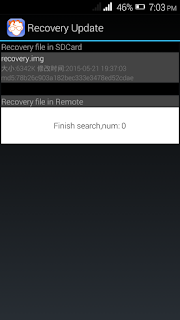
Open mobile uncle app as shown below...

Now click on recovery update...
And you will find your downloaded recovery ready to be flashed...
Click on if and it will prompt you a confirmation that are you sure...
Click yes and you are good to go...

That's all guys. Custom ROMs loading please come back often for latest updates..
Feel free to lodge your feedback using the comment button...
Good day...
I love everything about it except the user interface its not so beautiful as I thought...
If you are someone like me who wants to flash in a custom ROM then this article is for you...
Today I have created the infinix recovery file so everyone can flash it isn't their phone..
Backup your ROM with ease and flash amazing ROMs...
Download links below....
Download this awesome Android app
infinix hot x5o7 recovery
Philz recovery here...
Note: I stored the recovery in mega app.. So if you don't have mega installed.it will take you to play store..
Download philz recovery for infinix hot x507 here
For those who do not know how to flash in this recovery...
Please follow this steps...
Please note that you must be rooted..
Rename your downloaded recovery to recovery.img and place it in your root folder..
Open mobile uncle app as shown below...

Now click on recovery update...
And you will find your downloaded recovery ready to be flashed...
Click on if and it will prompt you a confirmation that are you sure...
Click yes and you are good to go...


http://pinkberrylicious.blogspot.com /2015/06/infinix-hot-flashable-stock-rom.html?m=1">For infinix hot stock Rom please click here
That's all guys. Custom ROMs loading please come back often for latest updates..
Feel free to lodge your feedback using the comment button...
Good day...
الأحد، 29 مارس 2015
GIONEE P4 Root Recovery And Custom Roms
Hello everyone... Welcome to the andro9ja website... A place where we give you solutions to all your android problems..
Today we will talk about....
1..how to root your Gionee p4
2.how to flash custom recovery...
3..how to flash custom ROMs...
4.give you a list of beautiful ROMs...
Let's get started....
Download this awesome Android app
1...Rooting your Gionee p4.
Here download kingroot
Open and install...Click on the big circle
.jpg)
Wait for the process to be completed.
And you will have this

That's it...your phone is rooted...
2. Flashing custom recovery...
Download mobile uncle tools here from google play store
Or direct download from here
Download twrp from here
I prefer twrp to cwm....it has more advanced features...
Flash via mobile uncle...
Download Download and rename it to recovery.IMG and place it in your sdcard root folder..
Goto mobile uncle... Click on update recovery... There u will find your already downloaded recovery..
Flash it from there.. And there you go... Once finished it will prompt you to boot into recovery and yes its done.
3.custom ROMs..
Its easy flashing roms ... Boot into recovery mode. Clear cache..wipe dalvic cache and there you go..
Volume up and down to scroll..
Power key to select...
Scroll to install zip from SD card and locate your already downloaded ROM..
Flash from there.
4..custom ROMs..
Here I will drop download links to ROMs..(note flash at your own risk.I won't be responsible for any bricked device)
I. COLOUR OS for GIONEE P4
DOWNLOAD HERE
Colour Os 2 download here
WIPE CACHE
WIPE FACTORY
WIPE DAIVIK
INSTALL ZIP IN SD
WAITT ..THEN INSTALL 2 PATCH
REBOOT SYSTEM !
ENJOY IT
2.GIONEE P4 KITKAT ROM
Download it hereit here
Update deodex.. download here
Note:flash deodex after you flash the real ROM.
3.LG G3 KITKAT ROM.
download here
4.NOVA P LEAGOO ROM
Download here
5.VIBE UI
download here

6.MIUI V6
download here

7.AOSP V3 LOLIPOP
download here
8.SAMSUNG SIII ROM
download here

 Thanks everyone for reading this post...
Today we will talk about....
1..how to root your Gionee p4
2.how to flash custom recovery...
3..how to flash custom ROMs...
4.give you a list of beautiful ROMs...
Let's get started....
Download this awesome Android app
1...Rooting your Gionee p4.
Here download kingroot
Open and install...Click on the big circle
Wait for the process to be completed.
And you will have this
That's it...your phone is rooted...
2. Flashing custom recovery...
Download mobile uncle tools here from google play store
Or direct download from here
Download twrp from here
I prefer twrp to cwm....it has more advanced features...
Flash via mobile uncle...
Download Download and rename it to recovery.IMG and place it in your sdcard root folder..
Goto mobile uncle... Click on update recovery... There u will find your already downloaded recovery..
Flash it from there.. And there you go... Once finished it will prompt you to boot into recovery and yes its done.
3.custom ROMs..
Its easy flashing roms ... Boot into recovery mode. Clear cache..wipe dalvic cache and there you go..
Volume up and down to scroll..
Power key to select...
Scroll to install zip from SD card and locate your already downloaded ROM..
Flash from there.
4..custom ROMs..
Here I will drop download links to ROMs..(note flash at your own risk.I won't be responsible for any bricked device)
I. COLOUR OS for GIONEE P4
DOWNLOAD HERE
Colour Os 2 download here
WIPE CACHE
WIPE FACTORY
WIPE DAIVIK
INSTALL ZIP IN SD
WAITT ..THEN INSTALL 2 PATCH
REBOOT SYSTEM !
ENJOY IT
2.GIONEE P4 KITKAT ROM
Download it hereit here
Update deodex.. download here
Note:flash deodex after you flash the real ROM.
3.LG G3 KITKAT ROM.
download here
4.NOVA P LEAGOO ROM
Download here
5.VIBE UI
download here
6.MIUI V6
download here
7.AOSP V3 LOLIPOP
download here
8.SAMSUNG SIII ROM
download here
Feel free to request for any ROM...even for other phones... I will get them for you...
الاشتراك في:
الرسائل (Atom)