Mobile app UI and Wireframe tool makes mobile app development work easier and faster. By incorporating the use of these tools, you will be able to modularize your mobile app. These tools makes your development task easier and faster then anything. Create modules and prototypes test them, share them and update with whatever feedback you got with rapid and incremental approach.
3. Invision:Invision is meant for design better, faster and together. It is a most powerful design prototyping tool. Just upload your designs and add hotspots to transform your static screens into clickable, interactive prototypes complete with gestures, transitions, and animations.
4. Sencha:Sencha enables you to create native-looking HTML5 apps using JavaScript. Sencha Touch is the leading MVC-based JavaScript framework for building cross-platform mobile web applications. Sencha Touch leverages hardware acceleration techniques to provide high-performance UI components for mobile devices.
Sencha provides collection of high performance UI widgets, adaptive layout, animations and smooth scrolling, back end agnostic data package and lots more.
5. Framer:Framer enables you to invent, design and experiment with interactions to prototype mobile apps. Prototyping helps designers, developers and many others effectively communicate concepts, ranging from micro-interactions to entire on boarding flows.
Explore interactions for desktop apps, websites or mobile platforms. Choose from 8 pre-installed devices in multiple colors or quickly modify your exact setup.
6. Trigger:Trigger provides you freedom to build native apps for iOS and Android using JavaScript, native UI, push, analytics, login modules "out-of-the box", build service, no need to setup Eclipse / Xcode, update your app without re-submitting to the App Store,open platform, extend with hooks, write native modules.
Build native mobile apps for multiple platforms from a single codebase.
7. Lungo:Lungo is a HTML5 framework for mobile app development. Lungo supports open web standards, such as HTML5, CSS3 and JavaScript. It brings consistent browser environment across mobiles, TVs and desktop devices.
Forget heavy and old frameworks, you develop apps for actual devices. Take advantage of it! and let Lungo offers you a simple and fun way to create.
Create apps for each platform is hard, this situation is increased by the arrival of new devices. Lungo will suit all of them creating a unique and amazing UX.
8. Jo:The simple open source app framework for HTML5 for iOS, Android, Windows 8, BlackBerry 10, Tizen, Chrome OS & anything else with HTML5 Widgets, lists and scrolling goodness using JavaScript & CSS3. Make native mobile apps or web apps with the same code. Works great with PhoneGap.
 9. DHTMLX Touch:
DHTMLX Touch is a free open source JavaScript library for building HTML5-based mobile web apps. It's not just a set of UI widgets, but a complete framework that allows you to create eye-catching, robust web applications that run on iOS, Android, and other mobile platforms.
10. Appcelerator:Write in JavaScript, run native everywhere. Build native cross-platform apps at the speed of mobile - with no hybrid compromises. Features of Appcelerator:
- 60-90% code reuse across device platforms
- Delivers fully native apps for rich user experience
- Immediate support for each new OS release
- Seamless integration to existing continuous delivery systems (e.g. SCM, build and MDM solutions).
11. Junior:
It is a front-end framework for building HTML5 mobile apps with a native look and feel.
Junior offers following features:
- CSS3 Transitions optimized for mobile performance.
- Swipeable carousels using flickable.js.
- Integration with backbone.js views and routers.
- Ratchet CSS UI components.
- Try loading this page on a mobile phone or try our "simulator" to the right.
12. Proto:Silly-fast prototyping. Create fully-interactive high-fidelity prototypes that look and work exactly like your app should. No coding required.

13. Indigo Studio:
Discover the right design, code-free. Don’t waste valuable resources by writing and rewriting code. With our rapid prototyping tool, Indigo Studio, let your users and stakeholders experience your Web, desktop, or mobile application idea and find the right design – all without writing a single line of code.
Indigo Studio lets you create functional, animated UI prototypes while maintaining the focus on user experience at every step. Whether you’re a designer without developer skills, a developer without design resources, or anyone with a great idea - you can design storyboards in real-world context, quickly build application design interactions that integrate with your storyboards and annotate those designs.
Easily share your best designs with team members and key stakeholders and go from idea to app faster than you previously thought possible.
14. Mockingbird:It is an online tool that makes it easy for you to create, link together, preview, and share mockups of your website or application. Mock it up fast, make links and collaborate.
15. Simulify:Visualize Apps with Interactive and Shareable Wireframes/ Mockups/ Prototypes.
16. Solidify:Multi-Device Prototyping. Easily test your prototypes the way they were meant to be used, on any desktop, phone or tablet.
Solidify lets you create clickable prototypes from sketches, wireframe, or mockup. Validate user flows on any device by performing user tests in person, remotely or on your testers own time to get the feedback you need.
17. ForeUI:ForeUI is an easy-to-use UI prototyping tool, designed to create mockup / wireframe / prototypes for any application or website you have in mind. With ForeUI, your prototype project will be skinnable, since you can easily change the style of your prototype by simply switching the UI theme.
You can even design the behavior of prototypes by defining intuitive flow charts to handle specific events.
Your prototype can then be exported to wireframe images, PDF documents or HTML5 simulation. All of these make ForeUI a very useful productive tool for sharing ideas, reviewing design concepts, collecting feedback and usability testing.
18. LUMZY:Lumzy is a quick mockup creation and prototyping tool. From creating a prototype, to sending it to clients, everything is seamless. In fact, Lumzy doesn't have a file extension, so your client need not bother downloading a player to open any prototype files. A link is all they need.
19. Conceptly:It is a collaboration and prototyping platform. Create fully interactive prototypes that look and work exactly like your app. You can share, annotate and get valuable feedback faster. visualize your apps before building it. It enables to design smarted and build better.
20. Mockup Builder:Mockup – is the convenient software that allows you to make a prototype of a site or a new design quickly and easily. We invite you to try it yourself, and discover the endless possibilities of web prototypes!
21. Appery:Appery is a drag and drop cloud based app platform. Build Mobile and Responsive Web Apps Fastly. It is the only cloud-based platform with visual development tools and integrated backend services.
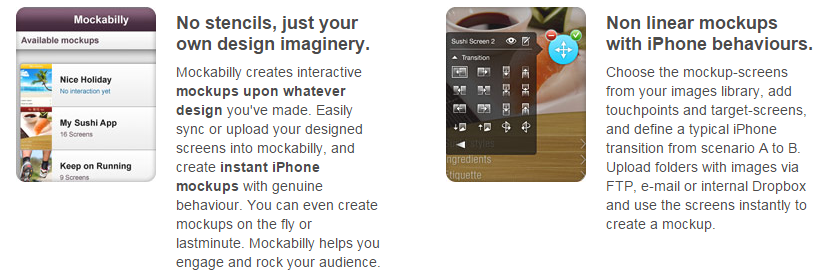
22. Mockability:Mockabilly creates interactive mockups upon whatever design you've made. Easily sync or upload your designed screens into mockabilly, and create instant iPhone mockups with genuine behaviour. You can even create mockups on the fly or last minute. Mockabilly helps you engage and rock your audience.
23. Pixate:The next generation of mobile interaction design. Pixate empowers you to create sophisticated animations and interactions that come to life through 100% real, native iOS and Android prototypes - from design to prototype, without the code.
With Pixate, building prototypes is simple and visual. No complex animation frameworks. No clunky simulation tools. Simply an intuitive design tool that empowers you to communicate and iterate ideas seamlessly and visually.
Producing 100% real, native iOS and Android prototypes. Native components. Native frameworks. Native dynamics. Experience your ideas the way they’re meant to be experienced— on device and at full fidelity.
24. Composite:Composite is a new, delightful way of prototyping. Composite is a brand new way of creating interactive prototypes. It automatically connects to your Photoshop® documents and converts your mockups into interactive prototypes in seconds. No need to export images or maintain tons of hotspots.
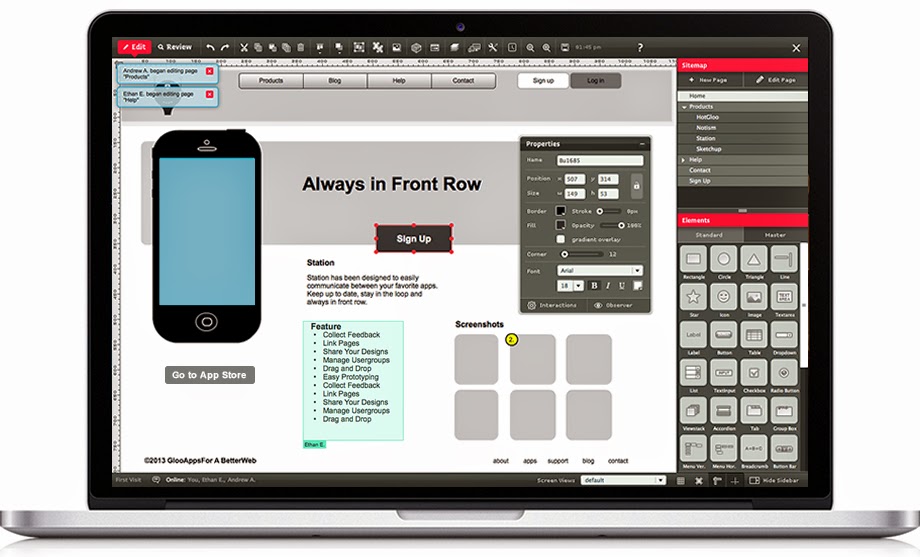
25. HotGloo:A better way to create wireframes and prototypes for web & mobile. Good software doesn’t need to be complex. That's why HotGloo is really intuitive and easy to use. You will feel at home immediately.
26. App Sketcher:Build interactive prototypes quickly with HTML and jQuery components. No coding required.
Go beyond typical mockups. Create rich interactions. Make your ideas real and tangible in minutes, not days.
27. Moqups:Moqups is a nifty HTML5 App used to create wireframes, mockups or UI concepts, prototypes depending on how you like to call them.
28. OmniGraffle:OmniGraffle is for creating precise, beautiful graphics. Like website wireframes, an electrical system design, a family tree, or mapping out software classes. For artists, designers, casual data-mappers, and everyone in-between.
29. MaCaw:Stop writing code, start drawing it. Macaw provides the same flexibility as your favorite image editor but also writes semantic HTML and remarkably succinct CSS. It's time to expect more from a web design tool.
30. Flinto:With Flinto mobile app design processes are broken into small modules.It’s easy to catch issues in your design when you are testing an interactive prototype. Problem is, that usually doesn’t happen until development starts. At that point, it’s too late to fix things.
Update to the above list there is another awesome tool for you. I have written a post on
http://pinkberrylicious.blogspot.com /2015/05/13-genuine-mobile-apps-that-can-pay-you.html" target="_blank">mobile apps that can save you money for you guys visit it and start earning with those apps.
31. Codly:
Codly allows you to convert your photoshop mobile designs into native code in second.
If you really want to make your designing and development process easier and faster you must try them.


.png)